Resume

Tactile support for a private bathroom routine.

A sleeve for an existing health faucet, designed to offer recognition and grip cues for people with middle-stage Alzheimer’s. The final concept connects the sleeve to a sensing module and caregiver app to support discreet routine tracking and timely help.

My role
Sole designer and researcher
15-month MRes thesis · Royal College of Art
Outcome
A connected-care concept: a tactile sleeve, sensing module and caregiver interface.

Research concept. Reviewed by caregivers and specialists. Use by people living with dementia remains untested.
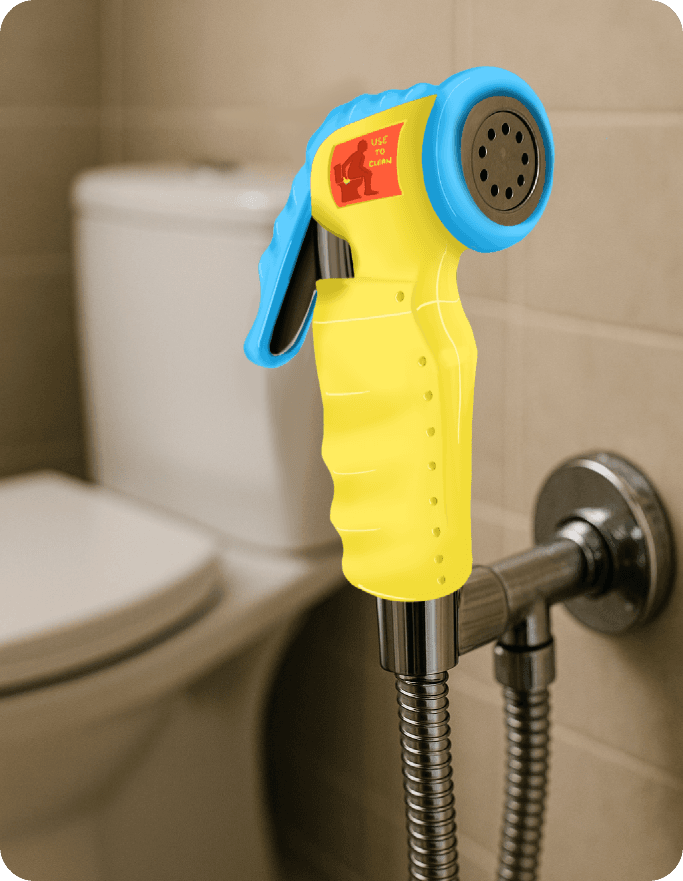
Forget Me Not silicone sleeve concept fitted to a health faucet beside a toilet
My concept render. A health faucet is a handheld water spray for personal cleaning, common in Indian bathrooms.

Inside the bathroom. Outside the door.

Caregiver accounts revealed a difficult choice: wait, prompt, or enter. Inside, a person may struggle to recognise the fitting or remember a step. Outside, a caregiver has little information to decide when help is needed.

Meera needs privacy. Anjali needs to know when to help.

Meera is the presentation’s persona for a person with middle-stage Alzheimer’s; Anjali is her daughter and primary caregiver.

  1. Enter

    Meera goes to the bathroom. Anjali stays alert outside.

  2. Miss a step

    Meera uses the toilet but may not recognise the health faucet’s purpose.

  3. Notice later

    Anjali discovers that personal cleaning may have been missed.

  4. Step in

    Anjali helps and explains the fitting again.

A research-informed scenario used to frame the design challenge, not a recorded test session.

Space to try.

Recognise the fitting. Hold it. Remember what comes next.

Closed doorLimited visibility

A reason to step in.

Know when support is needed, with fewer repeated questions.

Design question: how could the environment offer a cue before the caregiver has to?

A broad care problem became one focused intervention.

Interviews, literature, conference ethnography and journey mapping exposed an interconnected care system. The final presentation brings that exploration into one brief: support the private routine while helping the caregiver know when to intervene.

01 — The narrowing briefResearch synthesis
  1. 01

    Care system

    Everyday participation

    Outside this scope

    Policy, diagnosis and access

    Find a tractable design opportunity

  2. 02

    Communication

    Support at the moment of use

    Outside this scope

    A tool for every interaction

    Make the problem specific

  3. 03

    Toileting

    A private, repeated routine

    Outside this scope

    Other daily activities

    Balance privacy and timely help

  4. 04

    Health faucet

    Recognition, grip and use

    Outside this scope

    Four other bathroom fittings

    Start with one physical intervention

Each step reduced the scope until there was one interaction to investigate. Dashed branches show what moved outside the first intervention.
01 / Choose the moment

Why toileting?

Communication was too broad a brief. Toileting concentrated privacy, repeated prompting and uncertainty in one everyday routine.

02 / Choose the object

Why the health faucet?

It brought recognition, grip, orientation and personal cleaning together. The first concept could address these actions on one existing fitting.

03 / Choose the support

Why quiet cues?

Caregivers described repeated reminders and hovering as difficult. I prioritised persistent physical cues and selective caregiver feedback.

Five touchpoints · one design focusQualitative opportunity map

Where the routine can break—and where a physical cue could help.

Door handle

Find & enter

Cue opportunities: Door contrastPictorial sign
Wayfinding

Entry cannot establish completion.

Toilet seat

Position & use

Cue opportunities: Seat contrastForm cues
Deeper safety research

Positioning and transfers need investigation.

Flush

Dispose

Cue opportunities: Familiar controlAction cue
Future module

Less direct to personal cleaning.

Health faucet

Personal cleaning

Cue opportunities: ColourTextureGripOrientation
First intervention

Several physical cues on one existing fitting.

Water tap

Manage water

Cue opportunities: Handle positionTemperatureFlow
Future module

Mechanisms vary between homes.

Inside the selected interaction

My Miro map broke faucet use into smaller actions. Each introduces a different question.

  1. Locate

    Can I find it?

  2. Recognise

    What is it for?

  3. Grip & orient

    How do I hold it?

  4. Operate & clean

    What do I do next?

Adapted from my Miro activity mapping and thesis touchpoint comparison. Labels describe opportunities, not measured effectiveness; the number of cues is not a ranking.

How might we support independent toileting through visual cues and design nudges, while helping caregivers monitor usage discreetly and intervene when needed?

Condensed from the final jury presentation.

“When we ask them questions repeatedly, she gets very agitated.”

Family caregiver
Reduced repeated verbal prompting became a requirement.

“We put a picture of a toilet seat to show them it is the bathroom.”

ARDSI chairperson
Persistent environmental cues became a direction.

Research methods and boundaries

Family caregivers
Daily routines, repeated prompting, workarounds and uncertainty
Professionals and clinicians
Disease stage, behaviour and practical care patterns
ARDSI and DemCon
Indian care-system gaps, household realities and existing cues
Literature and mapping
Stage-related needs, communication, activities and relationships
Read what each source could and could not establish

Family caregivers

Could establish
Observed care situations
Could not establish
Patient comprehension or independent use

Professionals and clinicians

Could establish
Clinical and care context
Could not establish
Everyday adoption of this concept

ARDSI and DemCon

Could establish
Cultural and organisational context
Could not establish
A universal Indian experience

Literature and mapping

Could establish
A defensible synthesis
Could not establish
Direct evidence from people with dementia

Exploration shaped the final system.

The final presentation describes brainstorming, specialist co-design, caregiver feedback and impact–effort prioritisation. This landscape shows the earlier ideas behind the selected direction.

02 — The concept landscape13 explored · 3 retained
Retained ingredientNot pursuedOne mark = one concept
Thirteen concepts narrowed to three retained ingredients.Five ideas interpreted the person, three cued the environment and five rehearsed the routine. Routine tracking, real-time caregiver feedback and modular attachments were retained. Each line represents one concept, not a measured effect. All concepts and their reasons are available in the expandable list below.Concepts exploredNot pursuedRetained ingredients01 / Interpret the personBehaviour monitoringRoutine trackingSensing proposalNotice a possible gap in useReal-time caregiver feedbackCaregiver supportAsk for help selectivelyPersonal language logDiscreet help request02 / Cue the environmentVisual and tactile wayfindingGamified wayfindingModular attachmentsPhysical sleeveCue recognition and handling03 / Rehearse the routineAuditory promptingSound navigationGamified memoryDoll therapy roleplaySensors with sound feedbackOne physical concept.Two supporting proposals.Effectiveness remains untested.
Interpret the person2 of 5 retained
Cue the environment1 of 3 retained
Rehearse the routine0 of 5 retained
Explore the 13 concepts and their tradeoffs
01

Interpret the person

2 of 5 retained

  • Not pursued: Behaviour monitoring

    Signs vary and can be misread.

  • Retained: Routine tracking

    Informed passive sensing.

  • Retained: Real-time caregiver feedback

    Became the exception alert.

  • Not pursued: Personal language log

    Adds logging work and stays fragile.

  • Not pursued: Discreet help request

    Must be remembered at the right time.

Retain selective support; avoid interpreting every behaviour.

02

Cue the environment

1 of 3 retained

  • Not pursued: Visual and tactile wayfinding

    Weaker as spatial processing declines.

  • Not pursued: Gamified wayfinding

    Creates a new learning task.

  • Retained: Modular attachments

    Became the physical sleeve.

Bring the cue to the object being used.

03

Rehearse the routine

0 of 5 retained

  • Not pursued: Auditory prompting

    Can become noise or feel infantilising.

  • Not pursued: Sound navigation

    Evidence was not strong enough.

  • Not pursued: Gamified memory

    Transfer to real use was uncertain.

  • Not pursued: Doll therapy roleplay

    Variable association and infantilisation risk.

  • Not pursued: Sensors with sound feedback

    Overstimulation and weak association.

Avoid new learning tasks and uncertain associations.

Combined direction
Sensing proposal

Explore whether use appears to occur.

Caregiver support

Flag an exception that may need help.

Physical sleeve

Place recognition and grip cues on the fitting.

Selection rationale reconstructed from the thesis. Each line or mark represents one concept. Retained means carried into the design direction, not validated in use.

Support should ask less of both people.

Expert discussions favoured visual and tactile cues over auditory prompting. Caregivers described hovering and guessing as exhausting. Together, these accounts strengthened the direction toward cues on the fitting and an alert only when help might be needed.

Source: thesis, “Expert Discussions and Insights Before Finalising the Idea.” These conversations supported the direction; they did not test its effectiveness.

A tactile sleeve. A sensing module. A caregiver interface.

I brought the cues onto the object itself: colour to draw attention, texture and grooves to suggest handling, and a wrap closure to fit an existing faucet.
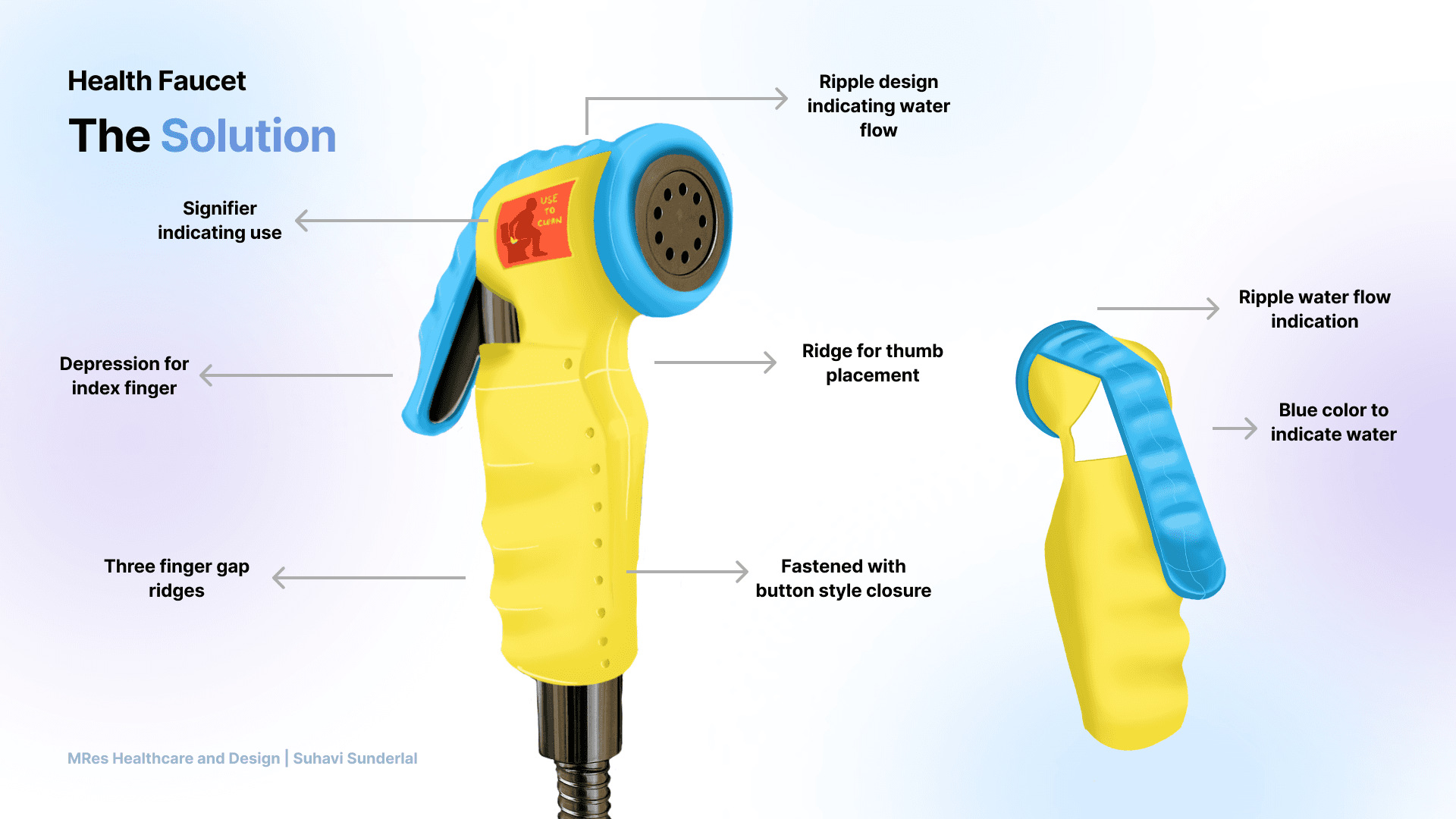
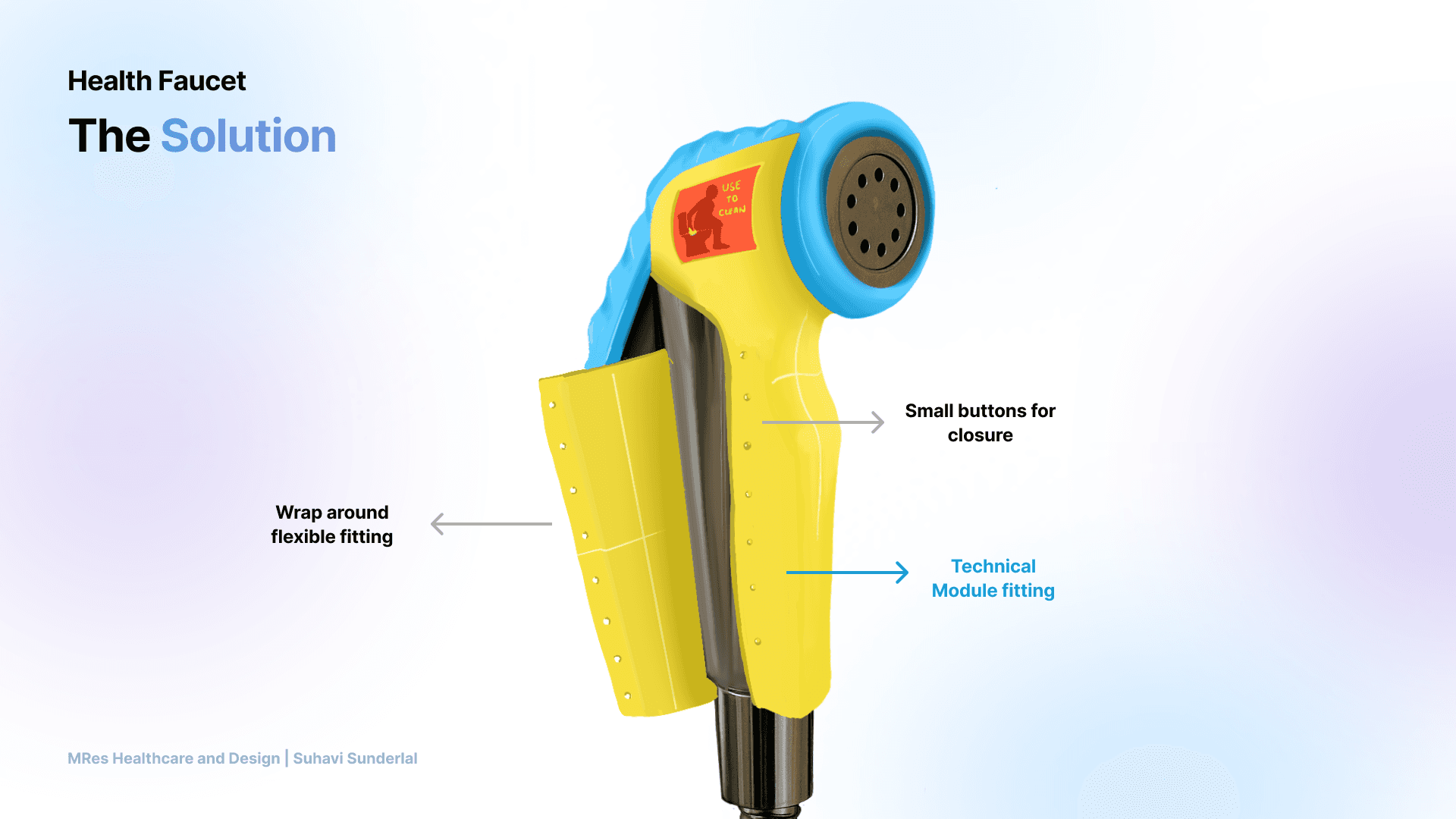
123Notice the fittingColour contrast and water-like ripplesKnow where to holdFinger grooves and a thumb ridgeFit an existing faucetA flexible, button-style wrap closure123
  1. Notice the fittingColour contrast and water-like ripple texture.
  2. Know where to holdFinger grooves and a ridge for the thumb.
  3. Fit an existing faucetA flexible, button-style wrap closure.
The sleeve adds physical cues to an existing health faucet; it does not replace the fitting.
See the original feature and wrap-closure drawings
Original viva drawing identifying the ripple texture, use signifier, thumb ridge, finger grooves and button closure
Feature locations and the reverse view from the viva.
Original viva drawing showing the sleeve opened around an existing faucet and its button-style closure
The proposed wrap-around fitting. The technical-module placement shown here is a concept, not validated integration.

The proposed sensing module

The final design combines an FSR pressure sensor and tilt sensor with an ESP32 Bluetooth module, battery and rechargeable enclosure.

  1. Pressure: is the fitting being held?
  2. Tilt: is it being moved?
  3. Bluetooth: share the signal with the caregiver app

Presented module specification. Integration, fit and reliable interpretation of use remain development work.

The caregiver interface

The final presentation pairs the sleeve with a Bluetooth-connected mobile application. Its role is to make routine information available outside the bathroom.

Routine tracking
A view of bathroom activities from entry to exit.
Missed-step alerts
A prompt when an expected action appears to be missing.
Pattern-based prompts
A proposed way to anticipate routines from previous use.
Extended-duration alerts
A prompt to check in when a visit takes longer than expected.

Interface capabilities presented as part of the final concept; predictive behaviour and alerts were not validated in use.

Fit the sleevePair the caregiver app
Use the bathroom fitting

Pressure + tilt are proposed as signals of use.

Use detected

Record the activity

The caregiver can check the routine and receive a use notification.

Missed use / possible exception

Prompt a check-in

An alert gives the caregiver a reason to offer support.

Final-presentation workflow, redrawn. Detecting movement or pressure would still need validation before it could indicate successful personal cleaning.

A direction to develop. A clear boundary of proof.

The work turned a broad question about independence into a specific intervention: a tactile sleeve and a proposed caregiver-support workflow. The concept and the sensing exploration reached different levels of maturity.

The specialist saw potential in a dignified, cost-conscious sleeve that could support hygiene routines.

Dementia specialist · feedback in the final jury presentation
Feedback supported developing the concept further.

A family caregiver anticipated that the fitting’s visibility and use signifier could help her mother recognise its purpose.

Primary caregiver · feedback in the final jury presentation
An expectation to test with the person using it.
03 — What the evidence supportsStatus at thesis completion
Caregiver need
ExploredInterviews and expert discussions
Sleeve concept
ReviewedCaregiver and specialist feedback
Tilt sensing
DemonstratedSaved tabletop Arduino firmware
Bathroom use
Not testedDirect use and integrated detection
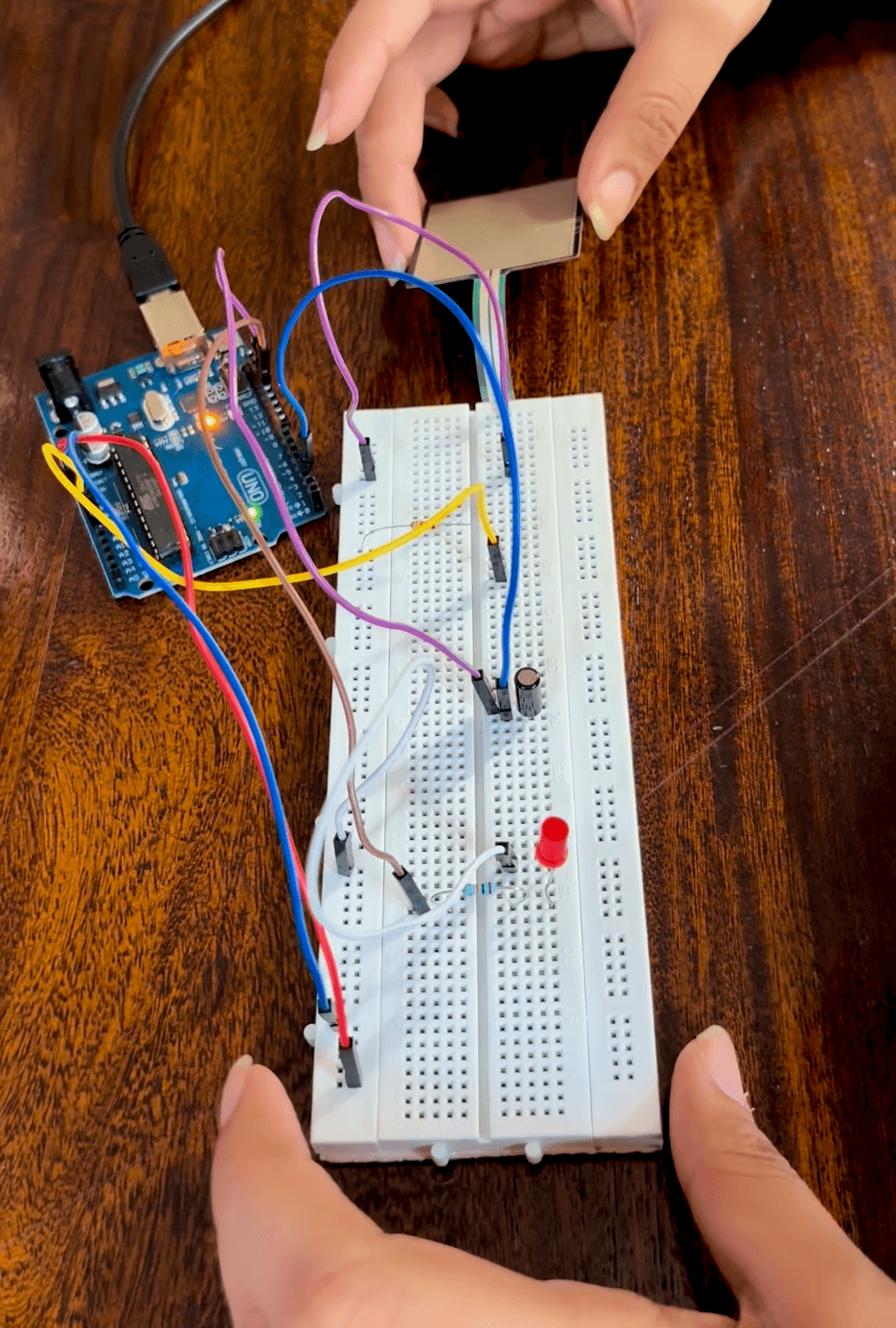
Interviews established the problem; feedback informed the concept; the circuit explored one sensing input.
Tabletop breadboard circuit connected to an Arduino, with wiring and LED output
Tabletop sensing exploration—not an integrated bathroom prototype.

A signal is only the beginning.

The saved Arduino firmware records tilt state on a tabletop circuit. It demonstrates that movement can produce a readable signal; it cannot establish whether personal cleaning occurred.

The proposed pressure-plus-tilt module remains unbuilt. The next engineering question is whether purposeful use can be distinguished from incidental movement in real bathroom conditions.

Trace the evidence through to the design requirements
EvidenceInterpretationRequirementResponseStatus
01

Caregiver account

Repeated questions can cause agitation

Reduce verbal prompting

Persistent colour and tactile cues

Research evidence only

02

Caregiver and professional accounts

Privacy makes continuous checking intrusive

Observe exceptions, not the person

Proposed missed or uncertain use alert

Concept reviewed, not validated

03

Stage and journey mapping

Recognition and sequencing can break within a familiar routine

Support the action at the object

Sleeve on the existing health faucet

Design hypothesis

04

Breadboard and firmware

Tilt state can be read on a tabletop circuit

Test sensing before integration

Proposed pressure plus tilt pattern

Integrated detection unproven

Build, test and extend the final concept.

The jury presentation closes with prototype integration, user testing and iteration, followed by additional bathroom fittings. Those next steps turn the final concept into a testable system.

  1. 01 · Build

    Finalise the prototype

    Risk to investigate

    The proposed technical module still needs integration into the sleeve.

    • Resolve module placement, power and enclosure
    • Check fit, grip, cleaning and waterproofing
    • Establish what pressure and tilt can reliably indicate
  2. 02 · Validate

    User testing and iteration

    Risk to investigate

    A recognisable object does not necessarily communicate how to use it.

    • Test recognition and handling with an approved, supported protocol
    • Observe use rather than infer it from caregiver expectations
    • Evaluate alert timing and false or missed signals
  3. 03 · Future scope

    Extend the bathroom system

    Risk to investigate

    Other fittings introduce different tasks and safety needs.

    • Explore the flush, tap, door handle and toilet seat
    • Adapt the concept to varied household fittings
    • Treat clinician-facing pattern analysis as a longer-term research ambition

The main lesson: narrow the intervention until its most important assumption can be tested. Here, that assumption is whether a cue on the object helps the person understand what to do.
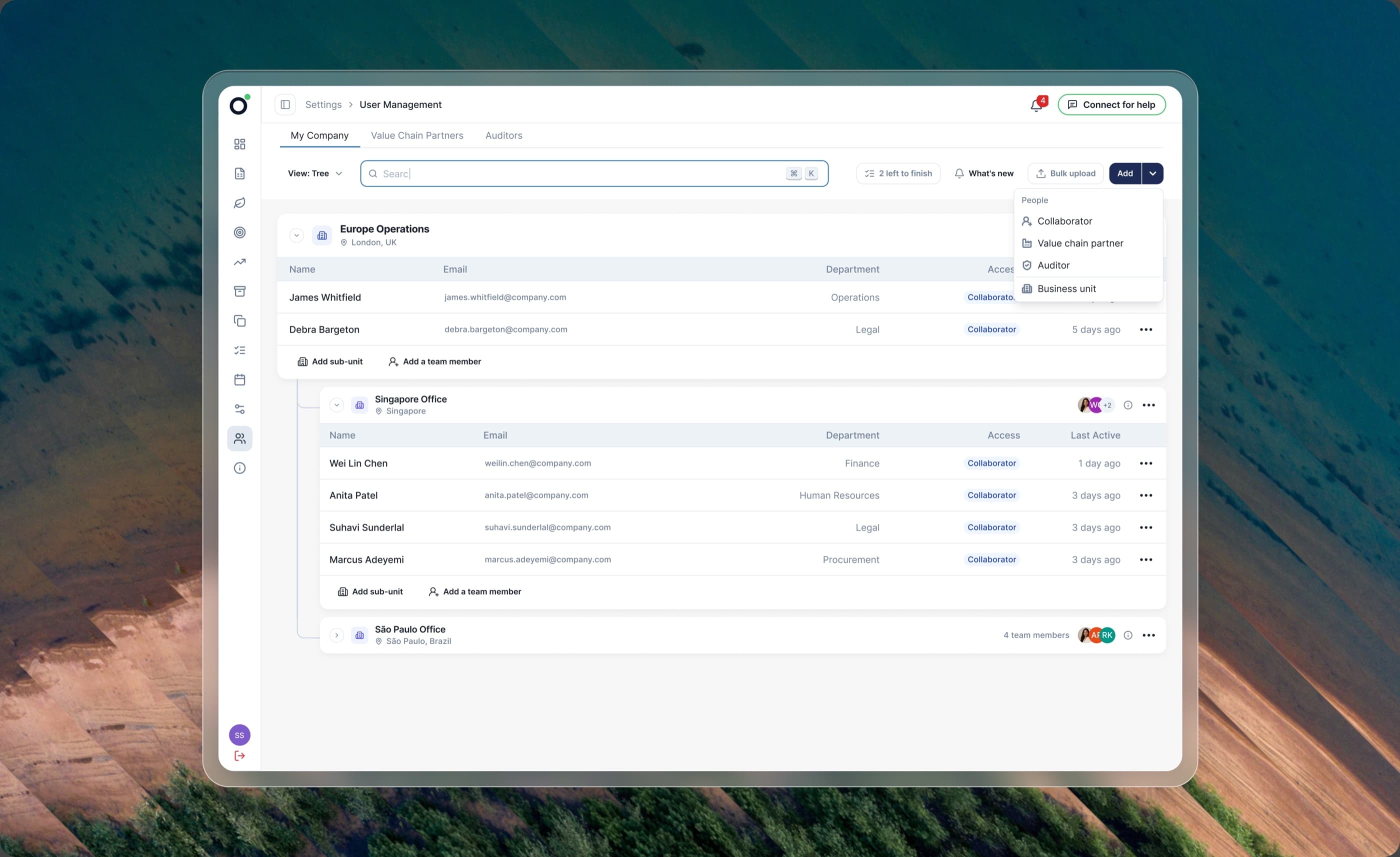
Oren organisation chart showing company structure and user management
Next case study

Oren · Setting up your company

Hierarchy, permissions and setup at different company sizes.